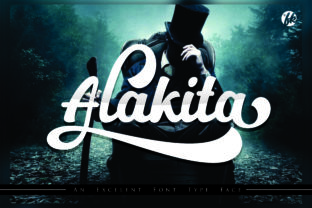
Alakita Font: Elevate Your Web Design with Handwritten Elegance
As a web designer or digital product creator, typography is one of the most powerful tools you have to shape user experience and brand perception. Alakita, a script handwritten font, brings a unique blend of elegance and customization to your design toolkit. Whether you're crafting a high-conversion landing page or building a visually compelling portfolio site, Alakita offers the personality and flexibility needed to stand out in a crowded digital landscape.
Alakita for Wedding Websites and Personalized Branding
Wedding websites demand a warm, romantic aesthetic that reflects the couple’s style. Alakita fits perfectly into this niche with its flowing, handwritten characteristics. The multiple glyph options per character allow for subtle variations in each letterform, making it ideal for names, invitations, and personal touches like thank-you messages or event details.
For branding, Alakita can help establish a tone of sophistication and approachability. Use it for hero titles or logo text on boutique wedding planners' sites, stationery designers, or even luxury fashion brands looking to inject some personality without compromising professionalism.
Design Tip: Use Alakita as an Accent Font for Maximum Impact
To maintain readability while leveraging Alakita's charm, pair it with a clean sans serif or minimalist serif font for body copy. This combination ensures visual contrast and helps guide users through content-rich sections like testimonials, pricing tables, or event schedules.
Alakita in Landing Pages and Conversion-Focused Typography
Landing pages are all about clarity and persuasion. While Alakita may not be suitable for long paragraphs due to its script nature, it shines in headline areas such as title banners, call-to-action buttons, and feature highlights. Its decorative yet legible style adds a layer of trust and creativity, especially when used in short, impactful phrases.
- Hero Section Headlines: Alakita works wonders for creating memorable headlines that stop users in their tracks.
- CTA Buttons: A custom phrase in Alakita can make your call-to-action feel more inviting and authentic.
- Feature Titles: When showcasing key benefits or features, a well-placed Alakita headline can enhance brand tone and engagement.
Optimizing Readability on Mobile Screens
Despite being a script handwritten font, Alakita is designed with digital screens in mind. For mobile responsiveness, ensure generous line spacing and avoid overly intricate alternates in small formats. Use bold weights or slightly increased font sizes to keep it legible on touchscreens and tablets. Dark backgrounds work best for nighttime browsing experiences, but light versions of Alakita also perform admirably against white or pastel tones.
Alakita for Boutique Online Stores and Creative Product Pages
If you're designing an online store for handmade goods, vintage items, or artisanal products, Alakita can add a personal touch that enhances perceived value. It's perfect for banner headers, product tags, and promotional overlays where a creative font can differentiate your brand from mass-market retailers.
Consider using Alakita in the following scenarios:
- Shop name or brand tagline
- Seasonal sales banners
- Product feature highlights (e.g., “Handcrafted” or “Limited Edition”)
- Category headers or collection titles
This font doesn’t just look good—it helps tell a story. And in e-commerce, storytelling is half the battle when it comes to converting browsers into buyers.
Responsive Layouts and Image Overlays
When integrating Alakita into image overlays—such as those used in app screens, social media graphics, or course thumbnails—make sure to test it across various resolutions. Its open curves and varied glyph styles make it adaptable to both transparent and opaque background images. For best results, use high-contrast color schemes and consider adding a subtle drop shadow or stroke to improve legibility over complex visuals.
Alakita for Blog Headers and Digital Content Sections
Blogs need fonts that balance creativity with clarity. Alakita can serve as an excellent header font for blog posts, section dividers, or newsletter titles. It brings a human element to editorial design, making content feel more personal and engaging.
Use it sparingly—for example, in category headers or featured post titles—to preserve the integrity of the overall layout. Pair it with a neutral typeface for body text to ensure easy scanning and a modern typographic rhythm.
Creating Visual Hierarchy with Alakita
In content-heavy layouts, visual hierarchy is crucial. Alakita can anchor important sections by drawing attention to key points. However, it’s essential to control its usage so it doesn’t overwhelm the reader. Limit it to top-level headings and use consistent styling for subheadings to maintain a clear structure.
Alakita for SaaS and Tech Branding with a Human Touch
SaaS platforms often lean towards minimalism and technicality, but there’s room for personality. Alakita allows you to introduce warmth into your digital identity—whether it's for a welcome message, a customer success quote, or a feature highlight. It bridges the gap between professional and personable, helping build trust with potential clients.
For instance, a productivity app might use Alakita in its hero section to present a tagline like “Write Better, Work Smarter.” The handwritten appeal makes the message feel more conversational and relatable, which is a strong conversion tactic in tech marketing.
Font Pairing Strategies for SaaS and Editorial Projects
Pairing Alakita with a modern sans serif like Inter or Roboto gives your designs a balanced yet stylish edge. Alternatively, a classic serif like Merriweather can create a more editorial or literary vibe. Always ensure the supporting font is highly readable at smaller sizes to complement Alakita’s display focus.
Using Alakita in Logo Design and Branded Assets
Logos and branded assets are the face of any business. Alakita provides a versatile base for creating logos that resonate emotionally. Its glyph options let you craft a unique variation of your brand name, ensuring it stands apart from generic templates.
When designing logos with Alakita, consider the context in which they’ll appear—mobile apps, email signatures, social media profiles, and print materials. Ensure the font maintains its integrity across different scales and file types. If available, check for webfont support to streamline integration into digital platforms.
Commercial Font Licensing for Web Designers
Before using Alakita in client projects, always confirm the licensing terms. Commercial font licenses are essential if you plan to deploy it on websites, landing pages, or digital templates. Make sure the license supports web embedding and covers multilingual characters if your project targets international audiences.
Alakita in Portfolio Sites and Creative Industry Websites
Creative professionals—from illustrators to photographers—often rely on typography to showcase their artistic voice. Alakita is a premium font choice for portfolio headers, project titles, and bio sections. It conveys passion and craftsmanship, aligning well with the aesthetics of a creative industry website.
Here’s how to implement it effectively:
- Use it for your name or tagline at the top of the homepage.
- Apply it to project titles to emphasize individual pieces.
- Integrate it subtly in footnotes or credits to maintain a cohesive brand kit.
Remember, the goal is to highlight your creative process without sacrificing usability. Alakita’s glyph diversity allows for thoughtful customization while keeping the design grounded in functionality.
Testing Alakita Across Platforms and Devices
Always preview Alakita on actual devices and platforms before finalizing your design. Test it on iOS, Android, desktop browsers, and retina displays to ensure it looks sharp and remains legible. For dark mode compatibility, consider using lighter weights or adjusting stroke contrast accordingly.
Alakita for Course Sales Pages and Educational Websites
Educational websites and course sales pages benefit from fonts that communicate both authority and approachability. Alakita can be used for course titles, instructor bios, or promotional slogans. It adds a touch of creativity that appeals to learners seeking a more personalized educational journey.
On course landing pages, Alakita can elevate the emotional impact of headlines like “Start Learning Today” or “Your Journey Begins Here.” These short, punchy phrases are where a script handwritten font truly shines, offering a sense of authenticity and urgency.
Ensuring Consistency in Brand Identity
Consistent typography is a cornerstone of strong brand identity. By incorporating Alakita into core design assets—like your logo, website headers, and social media posts—you create a unified visual language. This consistency reinforces brand recognition and builds familiarity across digital touchpoints.
Alakita in App Screens and UI Elements
In app design, every pixel counts. Alakita excels in UI elements that require expressive typography, such as splash screens, onboarding messages, or feature labels. Its dynamic script style can evoke excitement and curiosity, especially in lifestyle, wellness, or creative apps.
However, exercise caution when applying it to navigation menus or interactive components. Reserve it for decorative accents or secondary CTAs where legibility isn’t compromised. Always test its performance in real-world interactions to avoid usability issues.
Design Asset Integration Tips
If you're using Alakita in design assets like icons, buttons, or illustrations, export it in vector format to retain quality. Also, check for included styles and alternates to find the right match for each component. Some glyph sets may offer bolder or softer strokes, allowing you to fine-tune the visual weight depending on the UI context.
Why Alakita Fits Into Modern Typography Trends
Today’s design trends favor fonts that blend artistry with accessibility. Alakita meets this demand by providing a script handwritten option that feels both modern and timeless. Its ability to adapt to various contexts—from elegant branding to high-performance landing pages—makes it a valuable addition to any designer’s library.
With the right application, Alakita can transform a standard layout into something memorable. It’s not just about aesthetics; it’s about enhancing user engagement and reinforcing brand values through thoughtful typography choices.
Final Considerations Before Downloading Alakita
Before downloading Alakita, review the included weights, alternates, and glyphs to determine its suitability for your specific project. Confirm whether it supports the languages and symbols required for your audience. Lastly, verify the commercial font license to ensure it can be used across your intended platforms—web, mobile, or print.
Typography is more than just choosing a pretty font. It’s about finding the right tool to amplify your message and connect with your audience. Alakita does just that.